On this page
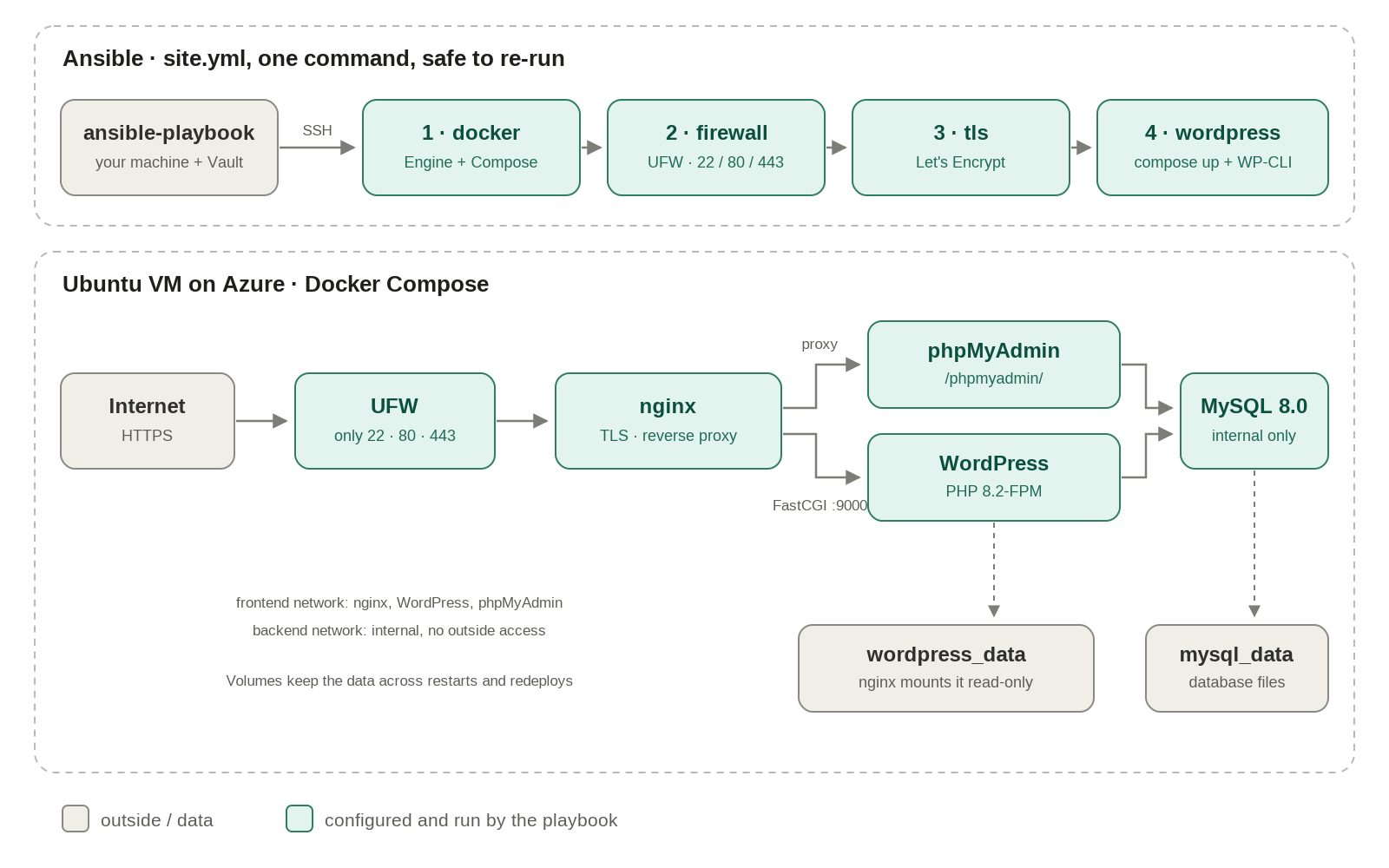
Setting up a server by hand is a list of fifty small steps, and the second time you do it you forget three of them. In cloud-1, a fresh Ubuntu virtual machine on Azure becomes a secured WordPress site with HTTPS from one command, and running that command again changes nothing that is already right.
This article follows the playbook role by role, with the real files from my repository. Two parts are interactive: a simulated ansible-playbook run that shows what “idempotent” looks like, and a tracer that follows requests through the firewall, nginx, WordPress and MySQL.
The goal
The subject: deploy a WordPress site to a cloud server, fully automatically, with every service in its own container, data that survives restarts, and nothing reachable that should not be. The same command must also be able to redeploy or update the site without breaking it.
- command to deploy
- 1
- Ansible roles
- 4
- containers, plus a WP-CLI helper
- 4
- open ports: 22, 80, 443
- 3
Why Ansible
Ansible configures machines over plain SSH: there is nothing to install on the server beforehand. You describe the result you want as a list of tasks, each one calling a module (install a package, write a file, run a command), and group related tasks into roles. Four words cover most of it:
- Inventory
- The list of servers to configure, with how to reach them and per-host settings.
- Playbook
- Which roles to apply to which servers, in which order.
- Role
- A folder of tasks, templates and handlers for one job: Docker, the firewall, TLS, WordPress.
- Idempotent
- Running it again gives the same result: each task checks the current state and only acts if something differs.
The whole deployment is this playbook, run with root privileges on every host in the inventory:
- name: Deploy Cloud-1 WordPress stack
hosts: webserver
become: true
roles:
- docker
- firewall
- tls
- wordpress
Preparing the server
The docker role installs Docker Engine and the Compose plugin from Docker's official repository, using the modern deb822 source format, and works out the CPU architecture and Ubuntu release instead of hard-coding them:
- name: Configure Docker apt repository
ansible.builtin.copy:
dest: /etc/apt/sources.list.d/docker.sources
mode: "0644"
content: |
Types: deb
URIs: https://download.docker.com/linux/ubuntu
Suites: {{ ansible_distribution_release }}
Components: stable
Architectures: {{ docker_dpkg_arch.stdout }}
Signed-By: /etc/apt/keyrings/docker.asc
The firewall role locks the machine down with UFW: deny everything coming in, then open only SSH, HTTP and HTTPS. UFW commands are not idempotent on their own, so the playbook reads UFW's answer and only reports a change when a rule was really added:
- name: Deny incoming connections by default
ansible.builtin.command: ufw default deny incoming
changed_when: false
- name: Allow outgoing connections by default
ansible.builtin.command: ufw default allow outgoing
changed_when: false
- name: Allow only SSH, HTTP and HTTPS from outside
ansible.builtin.command: "ufw allow {{ item }}/tcp"
loop:
- "22"
- "80"
- "443"
register: ufw_rule
changed_when: "'Skipping adding existing rule' not in ufw_rule.stdout"
- name: Enable UFW
ansible.builtin.command: ufw --force enable
changed_when: false
HTTPS with Let's Encrypt
The tls role, enabled per host, gets a free certificate from Let's Encrypt with Certbot. To prove it controls the domain, Certbot answers a challenge on port 80. Before anything else, the role checks whether a certificate already exists, so it is requested only once:
- name: Check whether Let's Encrypt certificate already exists
ansible.builtin.stat:
path: "/etc/letsencrypt/live/{{ domain_name }}/fullchain.pem"
register: letsencrypt_cert
when: use_letsencrypt
# standlone mode is used because the Nginx container is not runnig yet. Certbot will start its own temporary web server.
- name: Obtain Let's Encrypt certificate
ansible.builtin.command: >-
certbot certonly --standalone
-d {{ domain_name }}
--non-interactive
--agree-tos
-m {{ letsencrypt_email }}
when:
- use_letsencrypt
- not letsencrypt_cert.stat.exists
Certbot runs in standalone mode, with its own temporary web server, because nginx is not running yet on a first deployment (and when it is, an earlier task stops it to free port 80). The certificate is then copied next to the app, the private key readable by root only:
- name: Copy Let's Encrypt private key
ansible.builtin.copy:
src: "/etc/letsencrypt/live/{{ domain_name }}/privkey.pem"
dest: "{{ app_dir }}/certs/privkey.pem"
remote_src: true
mode: "0600"
when: use_letsencrypt
The stack
The wordpress role runs four long-lived containers with Docker Compose: MySQL 8.0, WordPress on PHP 8.2-FPM, phpMyAdmin and nginx. The Compose file is a Jinja template, so the same file works with and without HTTPS. nginx is the only container that publishes ports, and it mounts the WordPress files read-only:
nginx:
image: nginx:alpine
container_name: cloud1_nginx
restart: unless-stopped
depends_on:
- wordpress
- phpmyadmin
ports:
- "80:80"
{% if use_letsencrypt %}
- "443:443"
{% endif %}
volumes:
- wordpress_data:/var/www/html:ro
- {{ app_dir }}/nginx.conf:/etc/nginx/conf.d/default.conf:ro
{% if use_letsencrypt %}
- {{ app_dir }}/certs:/etc/nginx/certs:ro
{% endif %}
networks:
- frontend
The containers sit on two networks. frontend lets nginx reach WordPress and phpMyAdmin. backend carries database traffic and is marked internal: containers on it can talk to each other, but it has no route to the outside world. MySQL is only on that one.
networks:
frontend:
backend:
internal: true
volumes:
mysql_data:
wordpress_data:
nginx decides what happens to each request. PHP goes to WordPress over FastCGI on port 9000; everything else, such as images, CSS and uploads, nginx serves itself straight from the shared volume:
location / {
try_files $uri $uri/ /index.php?$args;
}
location ~ \.php$ {
fastcgi_pass wordpress:9000;
fastcgi_index index.php;
fastcgi_param SCRIPT_FILENAME $document_root$fastcgi_script_name;
fastcgi_param HTTPS $https if_not_empty;
include fastcgi_params;
}
phpMyAdmin is reverse-proxied under /phpmyadmin/, and in HTTPS mode, plain HTTP is redirected:
location = /phpmyadmin {
return 301 $scheme://$host/phpmyadmin/;
}
location ^~ /phpmyadmin/ {
proxy_pass http://phpmyadmin:80/;
proxy_set_header Host $host;
proxy_set_header X-Forwarded-Proto $scheme;
}
{% if use_letsencrypt %}
server {
listen 80;
server_name {{ domain_name }};
return 301 https://$host$request_uri;
}
{% endif %}
Follow a few requests through it:
Pick a request and watch where it goes, and where it is stopped.
Internet
a visitor
UFW
22, 80, 443 only
frontend network
nginx
the only public container
wordpress
PHP-FPM :9000
phpmyadmin
proxied :80
wordpress_data
volume, read-only
backend network · internal: true
mysql
no published port
Installing WordPress
Containers that have started are not necessarily ready. MySQL needs a few seconds to initialise, and the WordPress image copies its files on first start. Instead of a fixed sleep, the role asks each one until it answers, up to 30 times, 2 seconds apart:
- name: Wait until MySQL accepts connections
ansible.builtin.command:
argv:
- docker
- compose
- exec
- -T
- mysql
- sh
- -c
- 'mysqladmin ping -h 127.0.0.1 -uroot -p"$MYSQL_ROOT_PASSWORD" --silent'
args:
chdir: "{{ app_dir }}"
register: mysql_ready
changed_when: false
retries: 30
delay: 2
until: mysql_ready.rc == 0
Then it installs WordPress itself with WP-CLI, in a throwaway container, so there is no setup wizard to click through. But only if WordPress is not installed already, which is what makes a second run safe:
- name: Check whether WordPress is already installed
ansible.builtin.command: >-
docker compose --profile tools run --rm wpcli
wp core is-installed --path=/var/www/html
args:
chdir: "{{ app_dir }}"
register: wordpress_installed
changed_when: false
failed_when: false
- name: Install the initial WordPress site
ansible.builtin.command: >-
docker compose --profile tools run --rm wpcli
wp core install
--path=/var/www/html
--url={{ site_scheme }}://{{ domain_name }}
--title={{ wordpress_title | quote }}
--admin_user={{ wordpress_admin_user | quote }}
--admin_password={{ wordpress_admin_password | quote }}
--admin_email={{ wordpress_admin_email | quote }}
--skip-email
args:
chdir: "{{ app_dir }}"
when: wordpress_installed.rc != 0
no_log: true
Run it twice
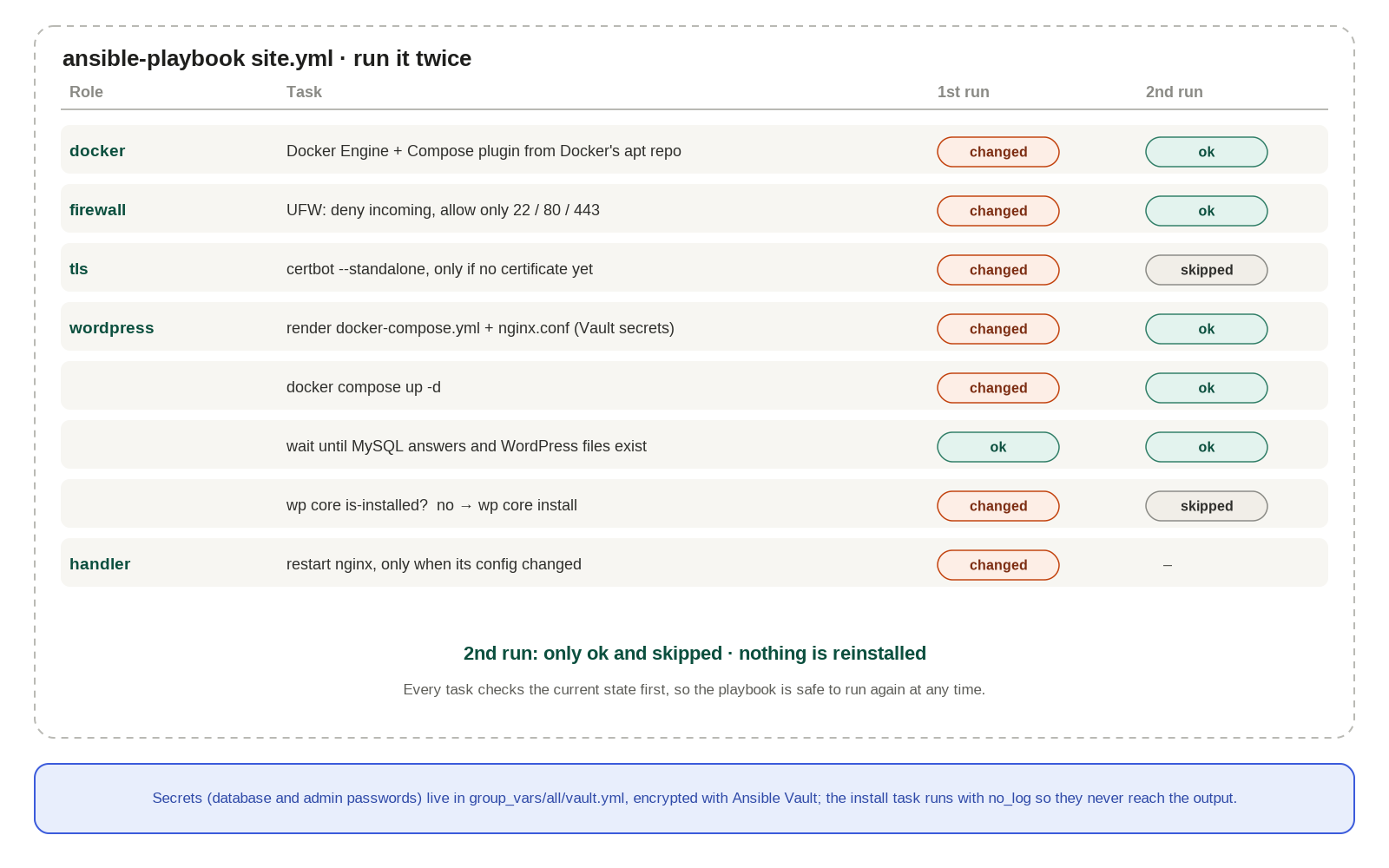
Idempotence is easiest to understand by watching it. On a fresh server, most tasks report changed. Run the same playbook again and almost everything is ok: already done, so nothing to do. Change one template and only the tasks affected by it act, and the handler restarts nginx:
- name: Render Nginx configuration
ansible.builtin.template:
src: nginx.conf.j2
dest: "{{ app_dir }}/nginx.conf"
mode: "0644"
notify: Restart nginx container
- name: Restart nginx container
ansible.builtin.command: docker compose restart nginx
args:
chdir: "{{ app_dir }}"
Run it on the fresh server, then run it again. Then edit nginx.conf.j2, or switch HTTPS off, and run once more.
runs: 0 · server: fresh Ubuntu VM
$ ansible-playbook site.yml --ask-vault-passSimulated from the tasks and conditions in the roles. On a real server, a few results depend on what is already installed.
Keeping secrets secret
The database and admin passwords never appear in plain text in the repository. They live in a file encrypted with Ansible Vault, and the normal variables only point to them:
mysql_database: wordpress
mysql_user: wp_user
mysql_root_password: "{{ vault_mysql_root_password }}"
mysql_password: "{{ vault_mysql_password }}"
Once decrypted at run time, they still have to stay out of sight:
- name: Render docker-compose.yml
ansible.builtin.template:
src: docker-compose.yml.j2
dest: "{{ app_dir }}/docker-compose.yml"
mode: "0600"
diff: false
- The rendered Compose file contains the passwords, so it is written with mode
0600, readable by root only, and withdiff: falseso Ansible never prints its content. - The WordPress install task uses
no_log: true, so the admin password is not shown even in verbose output. - The TLS private key is stored with mode 0600 and mounted read-only into nginx.
Limits and lessons
- Idempotence is designed, not free. Modules like
aptortemplatecheck state by themselves, but raw commands do not: everycommandtask here needed its ownchanged_when,whenor a check task before it. - Wait for readiness, not for time. Retrying until MySQL answers is faster on a quick server and still works on a slow one.
- Certificate renewal is the next step. Let's Encrypt certificates last 90 days, and standalone renewal needs port 80, which nginx holds. Switching to webroot mode with a renewal hook would automate it.
- Other known limits: Ubuntu only, one independent stack per host, image tags that float within their major version, and phpMyAdmin publicly reachable, which a production site should restrict.
The playbook, the roles and a detailed README are on GitHub.
About the project: cloud-1
Ansible takes a fresh Ubuntu server, such as an Azure VM, to a secured, containerized WordPress site with a single command: Docker, a firewall, HTTPS and an automatic WordPress install.
- 1 command
- HTTPS + firewall
- Idempotent
Built with
- Ansible
- Ansible Vault
- Docker Compose
- Nginx
- WordPress
- MySQL
- phpMyAdmin
- Let's Encrypt
- UFW
- Azure