On this page
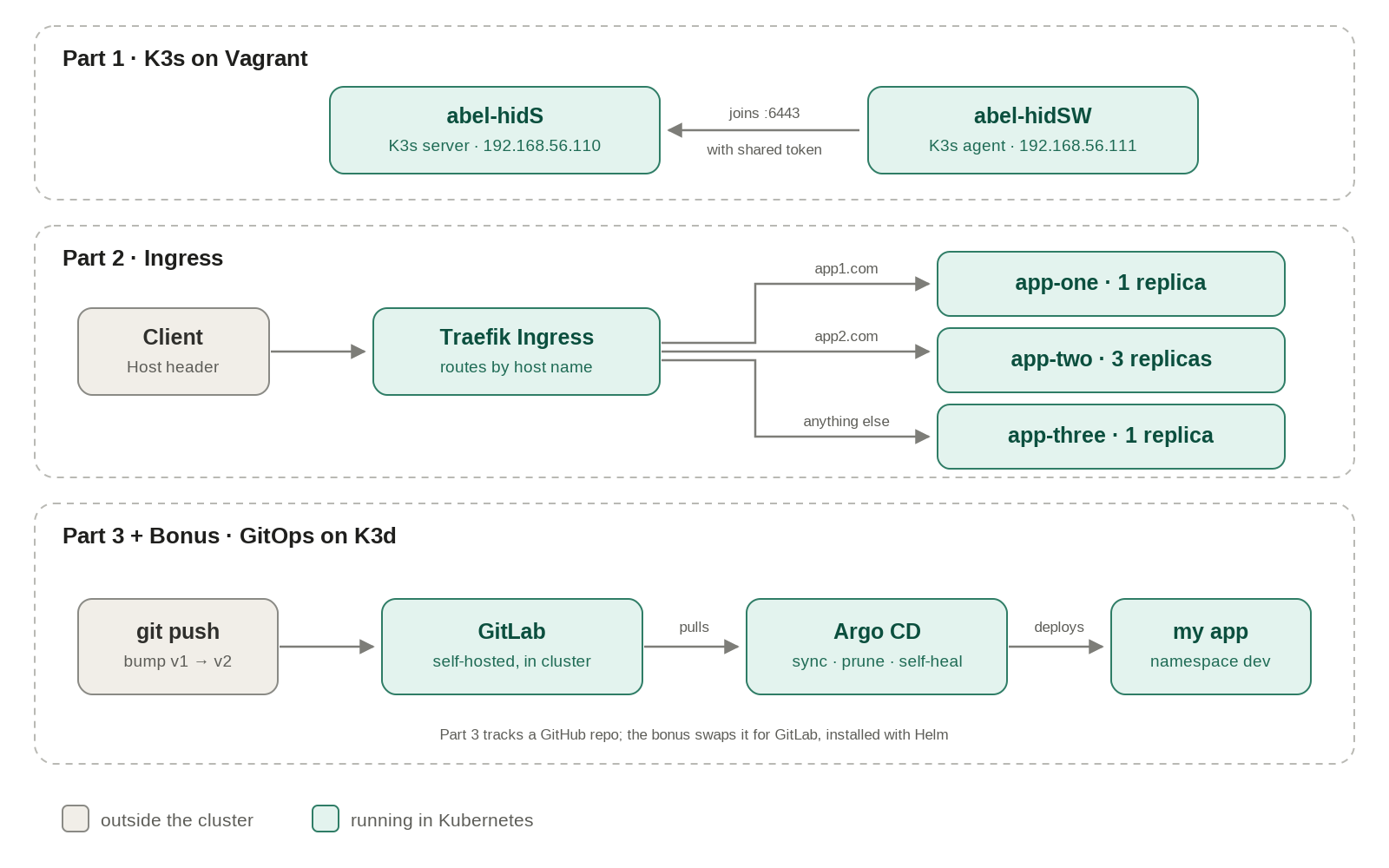
Running one container is easy. Running dozens of them, keeping them alive, routing traffic to them and updating them without downtime is a different job, and that job is Kubernetes. This project builds it up in stages, from two virtual machines to a cluster that deploys itself whenever I push to Git.
Inception of Things is a 42 project in three parts plus a bonus. This article walks through each one with the real files from my repository: Vagrantfiles, Kubernetes manifests and setup scripts. It has two interactive parts too: a simulated Ingress that you can send requests to, and a GitOps loop that you can break on purpose to watch it repair itself.
Why Kubernetes
The idea that makes Kubernetes click is desired state. You don't tell it “start three containers”. You declare “there should be three copies of this app”, in a YAML file, and Kubernetes runs control loops that constantly compare that declaration with reality and fix any difference. If a container crashes, the difference appears and a new one is started. You describe what; it handles how.
- parts, plus the bonus
- 3 + 1
- VMs in the first cluster
- 2
- pods behind one IP in part 2
- 5
- git push to deploy
- 1
Five words to know
The rest of the article uses five Kubernetes objects. Each one is a few lines of YAML:
- Pod
- The smallest unit: one or more containers that run together on a node, with their own IP.
- Deployment
- Declares which image to run and how many copies (replicas). Its controller creates, replaces and updates pods to match.
- Service
- A stable name and address in front of a group of pods, which come and go. It spreads traffic across them.
- Ingress
- Rules for HTTP traffic coming from outside: which host name or path goes to which Service.
- Namespace
- A folder for objects, to keep things apart: argocd, gitlab and dev in this project.
I used K3s, a lightweight Kubernetes distribution packed into a single binary, and in part 3 K3d, which runs K3s nodes as Docker containers instead of virtual machines.
Part 1: a cluster from two VMs
A cluster has a server (the control plane, which stores the state and makes decisions) and agents (workers that run the pods). Part 1 creates one of each as Debian virtual machines with Vagrant: abel-hidS at 192.168.56.110 and abel-hidSW at 192.168.56.111, on a private network, with 1 CPU and 1 GB of RAM each.
The interesting problem is the handshake. To join, the worker needs a secret token that only exists once the server has installed K3s. Vagrant shares the project folder with every VM as /vagrant, so the server drops its token there:
curl -sfL https://get.k3s.io | sh -
sleep 30
chmod 644 /etc/rancher/k3s/k3s.yaml
echo "alias k='kubectl'" >> /home/vagrant/.bashrc
cp /var/lib/rancher/k3s/server/node-token /vagrant/node-token
chmod 644 /vagrant/node-token
and the worker simply waits for the file to appear, then joins the server's API on port 6443:
worker.vm.provision "shell", inline: <<-SHELL
apt-get update -y
apt-get install -y curl
while [ ! -f /vagrant/node-token ]; do
sleep 2
done
NODE_TOKEN=$(cat /vagrant/node-token)
curl -sfL https://get.k3s.io | K3S_URL=https://192.168.56.110:6443 K3S_TOKEN=${NODE_TOKEN} sh -
One vagrant up later, kubectl get nodes lists both machines as Ready: a real, two-node Kubernetes cluster built from nothing.
Part 2: three apps, one IP
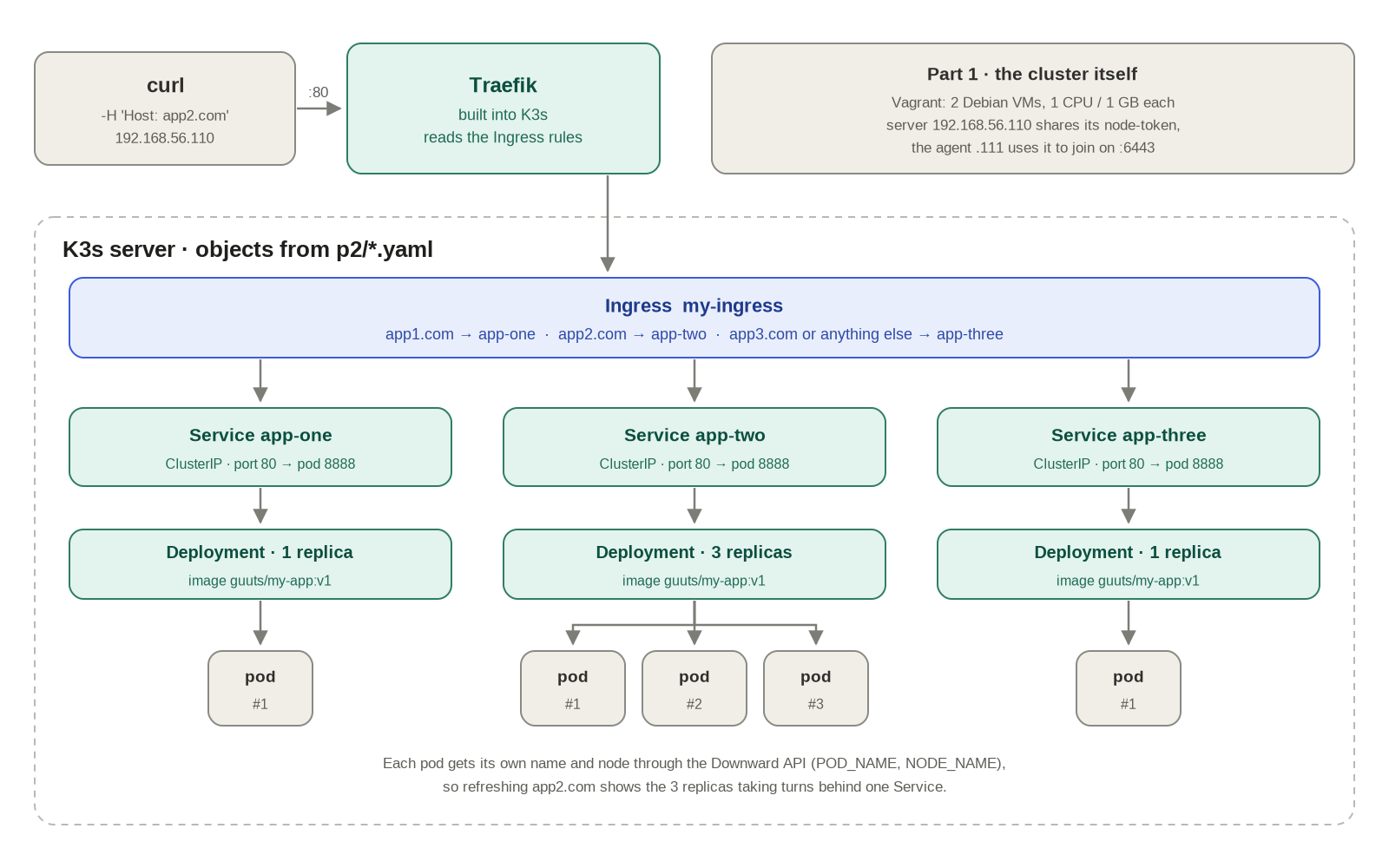
Part 2 runs three web apps on a single K3s machine and makes them reachable at one IP address. The app is a small Flask server of my own (my-app) that prints which app it is, and which pod and node answered. Those values come from the Downward API: Kubernetes injects the pod's own name and its node into environment variables.
apiVersion: apps/v1
kind: Deployment
metadata:
name: app-two
spec:
replicas: 3
selector:
matchLabels:
app: app-two
template:
metadata:
labels:
app: app-two
spec:
containers:
- name: app
image: guuts/my-app:v1
ports:
- containerPort: 8888
env:
- name: APP_NAME
value: "app2"
- name: POD_NAME
valueFrom:
fieldRef:
fieldPath: metadata.name
- name: NODE_NAME
valueFrom:
fieldRef:
fieldPath: spec.nodeName
APP_NAME = os.getenv('APP_NAME', 'app')
POD_NAME = os.getenv('POD_NAME', socket.gethostname())
NODE_NAME = os.getenv('NODE_NAME', 'unknown')
app-two asks for 3 replicas, the other two for one each. A Service gives each group of pods one stable address, and forwards port 80 to the app's port 8888:
---
apiVersion: v1
kind: Service
metadata:
name: app-two
spec:
selector:
app: app-two
ports:
- protocol: TCP
port: 80
targetPort: 8888
type: NodePort
The Ingress then decides which Service gets each request, using the Host header. K3s ships with Traefik as its Ingress controller, which reads these rules:
apiVersion: networking.k8s.io/v1
kind: Ingress
metadata:
name: my-ingress
spec:
rules:
- host: app1.com
http:
paths:
- path: /
pathType: Prefix
backend:
service:
name: app-one
port:
number: 80
…and a last rule without a host, which catches everything else and sends it to app-three:
- http:
paths:
- path: /
pathType: Prefix
backend:
service:
name: app-three
port:
number: 80
Try it. Every request goes to the same IP; only the host name changes:
Pick a host or type your own. Send app2.com several times: the three replicas take turns.
Ingress rules (in order)
- app1.comapp-one
- app2.comapp-two
- app3.comapp-three
- any other hostapp-three
svc/app-one
1 pod(s)
- k2x7q
svc/app-two
3 pod(s)
- 4hn2m
- 9qzt8
- wx5lp
svc/app-three
1 pod(s)
- r7d3v
Response
–
Simulated in your browser from p2/apps.yaml and p2/ingress.yaml. Pod names are examples: Kubernetes generates them.
The provisioning script applies the apps, waits until every Deployment reports available, and only then adds the Ingress:
sudo k3s kubectl apply -f /vagrant/apps.yaml
sleep 15
sudo k3s kubectl wait --for=condition=available --timeout=60s deployment --all
sudo k3s kubectl apply -f /vagrant/ingress.yaml
Part 3: GitOps with Argo CD
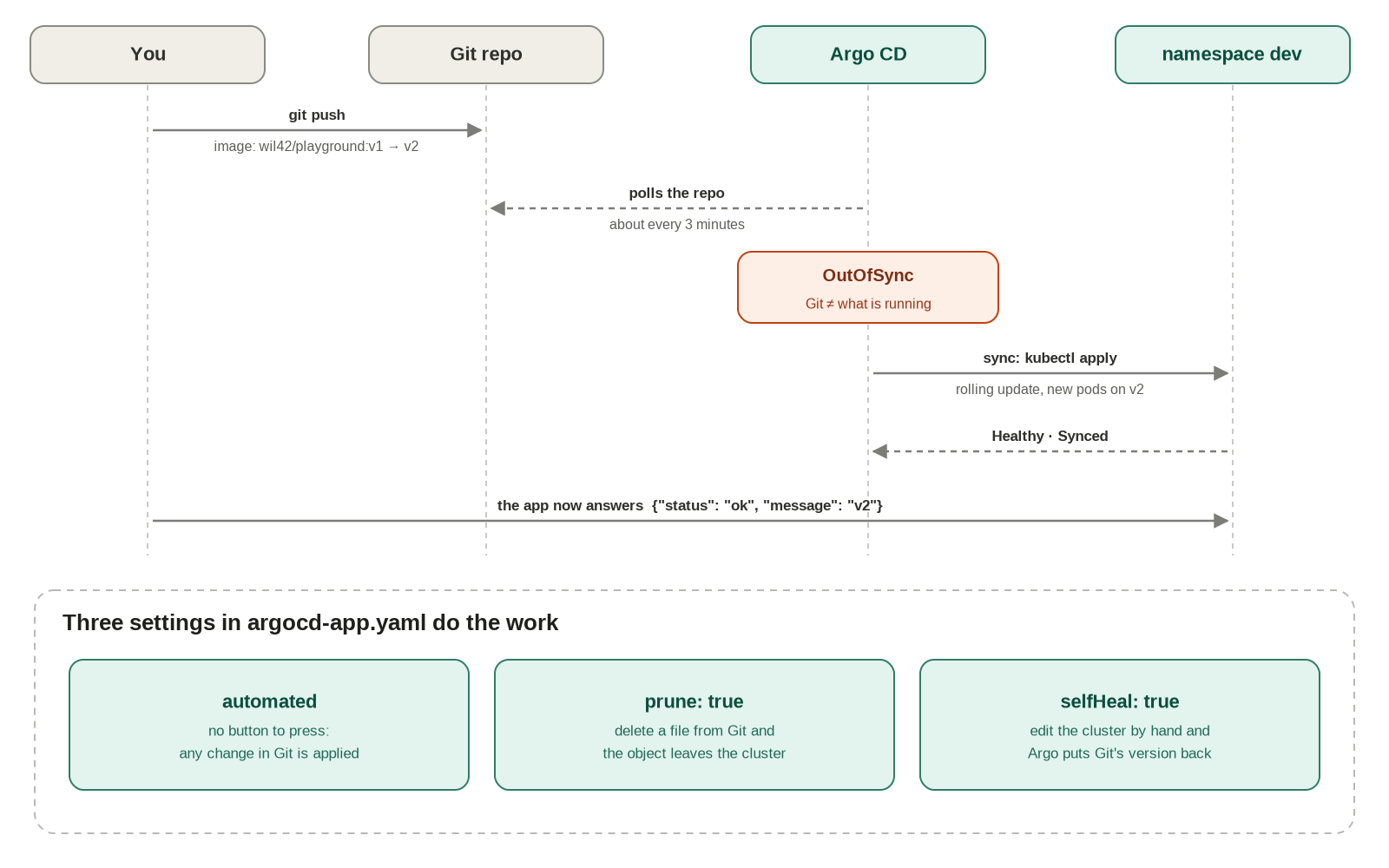
Until now, I deployed by running kubectl apply myself. GitOps turns that around: a Git repository becomes the single source of truth for what runs in the cluster, and an agent inside the cluster keeps the two equal. To deploy, you push a commit. To roll back, you revert it. Git's history becomes your deployment history.
Part 3 drops the virtual machines. K3d creates the cluster as Docker containers in seconds, with one server and one agent:
echo "=== Creating K3d cluster ==="
k3d cluster delete mycluster 2>/dev/null
k3d cluster create mycluster \
--servers 1 \
--agents 1 \
-p "8443:443@loadbalancer"
Then Argo CD is installed in its own namespace, and one object tells it what to watch: an Application pointing at a Git repository and a target namespace.
apiVersion: argoproj.io/v1alpha1
kind: Application
metadata:
name: my-app
namespace: argocd
spec:
project: default
source:
repoURL: https://github.com/abel-hid/test.git
targetRevision: master
path: .
destination:
server: https://kubernetes.default.svc
namespace: dev
syncPolicy:
automated:
prune: true
selfHeal: true
syncOptions:
- CreateNamespace=true
Those last options are where the magic is:
- automated: when Git changes, Argo CD applies the change by itself. By default it checks the repository every 3 minutes.
- prune: an object removed from Git is deleted from the cluster.
- selfHeal: if someone changes the cluster by hand, Argo CD puts it back the way Git says.
Here is that loop, sped up so a poll happens every few seconds. Push a new version, then try to break it:
Change the image tag or the replicas, then git push. Then scale the cluster by hand, or delete a pod, and watch who fixes it.
Git · deployment.yaml
kind: Deploymentreplicas: 2image: wil42/playground:v1
Cluster · namespace dev
- No resources found in dev namespace.
Events
Bonus: GitLab in the cluster
The bonus removes the last outside dependency: GitHub. A full GitLab runs inside the same cluster, and Argo CD pulls from it over the cluster's internal network. Nothing leaves the machine.
GitLab is a big application, so it is installed with Helm, Kubernetes' package manager, which renders dozens of manifests from a chart and a small values file. Mine turns off HTTPS and cert-manager, so everything works on gitlab.localhost:
global:
hosts:
domain: localhost
https: false
gitlab:
name: gitlab.localhost
https: false
ingress:
configureCertmanager: false
tls:
enabled: false
certmanager:
install: false
nginx-ingress:
enabled: true
installCertmanager: false
certmanager:
installCRDs: false
The cluster is created with Traefik disabled, since GitLab brings its own nginx Ingress, and with host port 8081 mapped to it:
echo "=== Creating K3d cluster ==="
k3d cluster create "$CLUSTER_NAME" \
--servers 1 \
--agents 1 \
--api-port 6550 \
--k3s-arg "--disable=traefik@server:0" \
--port "$GITLAB_PORT:80@loadbalancer" \
--wait
echo "=== Installing GitLab ==="
helm upgrade --install gitlab gitlab/gitlab \
-n gitlab \
--create-namespace \
-f "$VALUES_FILE" \
--timeout 30m \
--version 9.10.1 \
--set gitlab.webservice.minReplicas=1 \
--set gitlab.webservice.maxReplicas=1 \
--set gitlab.sidekiq.minReplicas=1 \
--set gitlab.sidekiq.maxReplicas=1 \
--set gitlab.gitlab-shell.minReplicas=1 \
--set gitlab.gitlab-shell.maxReplicas=1 \
--set gitlab.kas.minReplicas=1 \
--set gitlab.kas.maxReplicas=1 \
--set gitlab-runner.install=false
The Argo CD Application now points at GitLab's internal Service address instead of a public URL:
source:
repoURL: http://gitlab-webservice-default.gitlab.svc.cluster.local:8181/root/abel-hid.git
targetRevision: main
path: .
Installing GitLab takes 15 to 30 minutes and needs at least 8 GB of RAM, so I made the script idempotent: every step first checks whether it was already done, and the script can be re-run safely after any failure.
check_gitlab_installed() {
echo "=== Checking if GitLab is already installed ==="
if kubectl get namespace gitlab >/dev/null 2>&1; then
GITLAB_PODS=$(kubectl -n gitlab get pods --no-headers 2>/dev/null | grep -c "Running" || true)
if [ "$GITLAB_PODS" -gt 0 ]; then
echo "GitLab appears to be already installed with $GITLAB_PODS running pods."
if kubectl -n gitlab get secret gitlab-gitlab-initial-root-password >/dev/null 2>&1; then
GITLAB_PASSWORD="$(kubectl -n gitlab get secret gitlab-gitlab-initial-root-password -o jsonpath='{.data.password}' | base64 -d)"
echo "Retrieved existing GitLab root password."
fi
return 0
fi
fi
return 1
}
What I learned
- Declare, don't command. Once you think in desired state, Kubernetes, Argo CD and even Helm are the same idea at different levels: describe the result, and let a control loop get there.
- Wait for real readiness, not for time. Parts 1 to 3 still use fixed
sleeps; the bonus script waits on real conditions withkubectl waitandrollout status, which is both faster and more reliable. - GitOps makes the cluster boring, in a good way. Every change has a commit, an author and an undo button, and manual edits cannot silently survive.
- Know the limits. The README lists what I would fix next: some paths and URLs are specific to my machine, the part 3 script downloads macOS binaries, and the GitLab values file declares one key twice.
Everything, with a step-by-step README and troubleshooting notes, is on GitHub.
About the project: Inception of Things
Kubernetes from the ground up: a multi-node K3s cluster on Vagrant VMs, Ingress routing between apps, a GitOps pipeline with K3d and Argo CD, and a self-hosted GitLab running inside the cluster.
- 4 stages
- Argo CD GitOps
- GitLab in-cluster
Built with
- Kubernetes
- K3s
- K3d
- Vagrant
- Traefik
- Argo CD
- Helm
- GitLab
- Docker
- Flask