On this page
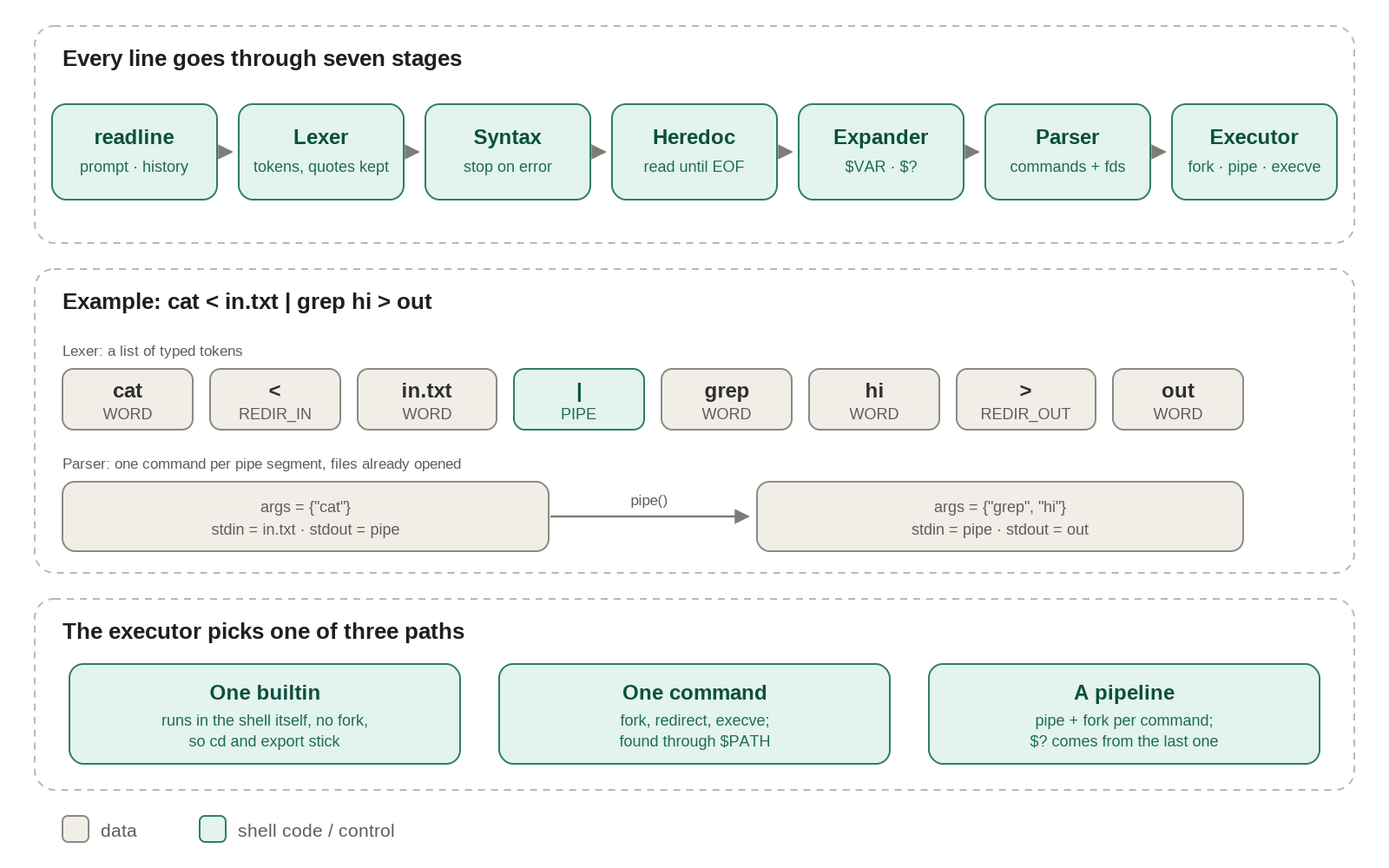
You type cat < in.txt | grep hi > out and press Enter. In the next few milliseconds, your shell cuts that line into pieces, checks it, replaces variables, opens files, creates processes, wires them together and waits for them. minishell rebuilds all of that, in C, from an empty file.
It is a 42 project we built in a team of two: a small Bash-like shell with pipes, redirections, heredocs, variables, signals and the usual builtins. This article follows one command line from the prompt to the processes, with the real code, and lets you watch every stage on a line you type yourself.
What a shell does
A shell is just a loop: show a prompt, read a line, run it, start again. Ours reads lines with GNU Readline, which gives history and line editing for free, and passes each line through the same pipeline of stages:
while (1)
{
action(&sa);
line = readline(str);
g_exit_st.done = 0;
line_managment(line);
if (minishell_prime(line) || haha(line))
continue ;
if (lexing(&lexer, line) == 0)
{
if(minishell(lexer, p_env) == 0)
parsing_all(&lexer, &cmd, &p_env, env);
}
free_stuff(line, &lexer, &cmd);
}
- stages per line
- 6
- builtins
- 7
- kinds of redirection
- 4
- global variable allowed
- 1
Cutting the line into tokens
The lexer turns the raw text into a list of tokens: words, and the operators |, <, >, << and >>. Spaces separate words, and an operator ends a word even without a space, so ls|wc is three tokens.
void create_lexer(char *line, t_lexer **list)
{
int i;
int token_length;
i = 0;
token_length = 0;
while (line[i])
{
if (is_space(line[i]))
{
i += skip_spaces(line, i);
}
else if (is_token(line[i]))
{
token_length = get_token(line, i, list);
i += token_length;
}
else
{
token_length = get_word(line, i, list);
i += token_length;
}
}
}
The subtle part is quotes. Inside quotes, spaces and operators lose their meaning: echo "a | b" is two words, not a pipe. So when the word reader meets a quote, it jumps straight to the matching closing quote:
int get_word(char *line, int i, t_lexer **list)
{
int j;
char *str;
char quote_type;
int quote_length;
quote_type = 0;
quote_length = 0;
j = 0;
while (line[i + j] && !is_token(line[i + j]) && !is_space(line[i + j]))
{
if (is_quote(line[i + j]))
{
quote_type = line[i + j];
quote_length = get_quote_length(line, i + j, quote_type);
j += quote_length + 1;
}
else
j++;
}
str = ft_strndup(line + i, j);
add_token(list, str, WORD);
return (j);
}
The quotes themselves are kept for now. The expander still needs them, to know which parts it is allowed to touch.
Checking the syntax
Before running anything, three checks reject malformed lines, with Bash's own error messages: a pipe can't start or end the line or sit next to another pipe, every quote must be closed, and every redirection must be followed by a file name.
int pipe_line_syntax(t_lexer **list)
{
t_lexer *tmp;
tmp = *list;
while (tmp)
{
if (tmp->token == PIPE_LINE)
{
if (tmp->prev == NULL || tmp->next == NULL)
{
printf("syntax error near unexpected token `|'\n");
return (1);
}
if (help_token(&tmp->prev) == 0 || help_token(&tmp->next) == 0)
{
printf("syntax error near unexpected token `|'\n");
return (1);
}
}
tmp = tmp->next;
}
return (0);
}
Working on tokens instead of raw text makes these rules short: a pipe just needs a non-pipe token on each side.
Heredocs and $VARIABLES
Heredocs (<< EOF) are read first, before any variable is expanded, as in Bash. The shell prompts with > until the delimiter line, and writes the body to a temporary file. Whether the body is expanded depends on the delimiter: << EOF expands $VAR, << "EOF" keeps the text exactly as typed.
int here_doc(char *str, char *line, t_env **g_env)
{
int fd;
int check;
fd = 0;
fd = ft_create_fd(fd);
check = valid(str);
str = del_quote(str, '\'', '\"');
while (1)
{
line = readline(">");
if (close_here_doc() == 1 || !line)
break ;
if (ft_strcmp(line, str) == 0)
{
free(line);
break ;
}
if (!check)
line = expand_heredoc(line, g_env);
ft_putendl_fd(line, fd);
free(line);
}
g_exit_st.in_here_doc = 0;
close(fd);
return (0);
}
Then the expander replaces $VAR with its value from the shell's own copy of the environment, and $? with the last exit status. The quote rules decide everything:
| You type | The command receives |
|---|---|
| echo $HOME | /home/abel-hid |
| echo "$HOME" | /home/abel-hid |
| echo '$HOME' | $HOME |
| echo "$USER in $HOME" | abel-hid in /home/abel-hid |
| echo $? | 0 (the last exit status) |
From tokens to commands
The parser turns the token list into one t_command per pipe segment: an args array ready for execve, and the input and output file descriptors. Quotes are removed at this point, and redirections are opened right away, so a missing file is reported before anything runs. When there are several redirections of the same kind, the last one wins, like in Bash.
Try it
Here is the front half of minishell, ported to TypeScript: the same lexer, syntax checks, expansion rules and parser. Type any line, or pick an example, and see what each stage produces, down to the processes the executor would create.
Nothing is executed: this shows how the line is understood and the processes it would start.
Environment: USER=abel-hid · HOME=/home/abel-hid · X="ls -l" · $?=0 · EMPTY unset
1Lexer: tokens
2Syntax check
OK: no syntax error
3Parser: t_command list
- t_command #1args = {"cat", NULL}open("in.txt", O_RDONLY)
- t_command #2args = {"grep", "hello world", NULL}open("out", O_CREAT|O_WRONLY|O_APPEND, 0644)
4Executor: processes
minishell (parent): pipe() and fork() for each command
child 1: cat
dup2(pipe1[1], 1)
dup2(fd_in, 0) ← in.txt
search $PATH → execve("cat")
child 2: grep
dup2(pipe1[0], 0)
dup2(fd_out, 1) ← out
search $PATH → execve("grep")
parent: closes its pipe ends, then waitpid() × 2; $? = exit status of the last command
Environment for this demo: USER, HOME and X are set, EMPTY is not, and $? is 0.
fork, pipe, dup2, execve
The executor has three cases. A builtin on its own runs inside the shell itself, because cd in a child process would change the child's directory and then vanish with it. Anything else gets its own process with fork():
int execute_the_shot(t_command *cmd, t_env **g_env, char **envp)
{
int a;
t_command *tmp;
tmp = cmd;
a = 0;
if (!cmd->args[0] &&!cmd->next)
return (0);
if (!cmd->next)
{
a = checkfor_builtins(cmd);
if (a == 1)
execute_built_ins(cmd, g_env);
if (a == 0)
norminette_help(cmd, g_env, envp);
return (0);
}
execute_on_pipes(cmd, g_env, envp);
wait_for_all(tmp);
return (0);
}
When a builtin runs in the shell with a redirection (echo hi > file), the shell first saves its own stdin and stdout with dup(), so it can put them back afterwards:
int dup_andclose(t_command *cmd)
{
if (cmd->fd.fd_in != 0)
{
if (cmd->fd.fd_in == -1)
{
g_exit_st.status = 1;
return (1);
}
g_exit_st.in = dup(0);
dup2(cmd->fd.fd_in, 0);
close(cmd->fd.fd_in);
}
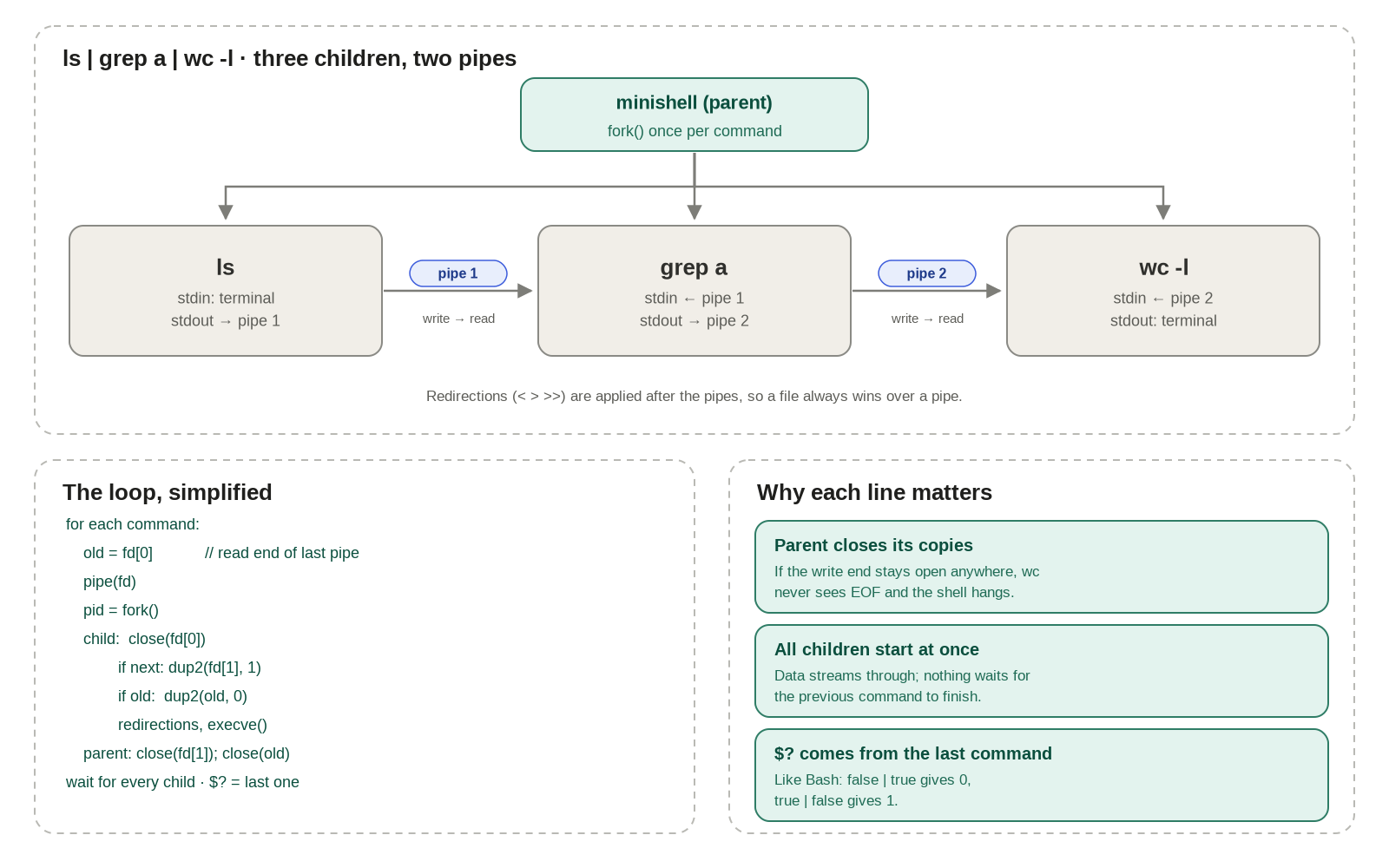
For a pipeline, each command gets a pipe and a child. A pipe is a pair of file descriptors: what is written to one end can be read from the other. Each child plugs its output into the next pipe and its input into the previous one with dup2(), and the parent closes its own copies straight away:
void execute_on_pipes(t_command *cmd, t_env **g_env, char **envp)
{
int fd[2];
int old;
int a;
a = 0;
fd[0] = -1;
fd[1] = -1;
while (cmd)
{
if (cmd->args[0])
a = checkfor_builtins(cmd);
old = fd[0];
protection(fd);
cmd->pid = fork();
if (cmd->pid == 0)
{
handle_child_process(cmd, fd, old);
execute_all(cmd, g_env, envp, a);
}
else if (cmd->pid > 0)
close_old(old, fd);
cmd = cmd->next;
}
close(fd[1]);
close(fd[0]);
}
void handle_child_process(t_command *cmd, int *fd, int old)
{
close(fd[0]);
if (cmd->next)
{
dup2(fd[1], 1);
close(fd[1]);
}
if (old != -1)
{
dup2(old, 0);
close(old);
}
handle_one_command(cmd);
}
The command's own redirections are applied after the pipe, so they win: in ls | cat > out, cat writes to the file, not to the terminal.
void handle_one_command(t_command *cmd)
{
if (cmd->fd.fd_out != 1)
{
if (cmd->fd.fd_out == -1)
{
g_exit_st.status = 1;
exit(1);
}
dup2(cmd->fd.fd_out, 1);
close(cmd->fd.fd_out);
}
if (cmd->fd.fd_in != 0)
{
if (cmd->fd.fd_in == -1)
{
g_exit_st.status = 1;
exit(1);
}
dup2(cmd->fd.fd_in, 0);
close(cmd->fd.fd_in);
}
}
Finally the parent waits for every child, and the exit status of the last one becomes $?:
void wait_for_all(t_command *cmd)
{
int s;
s = 0;
while (cmd)
{
waitpid(cmd->pid, &s, 0);
cmd = cmd->next;
}
if (s != 0)
g_exit_st.status = s / 256;
else
g_exit_st.status = 0;
}
Ctrl-C and exit codes
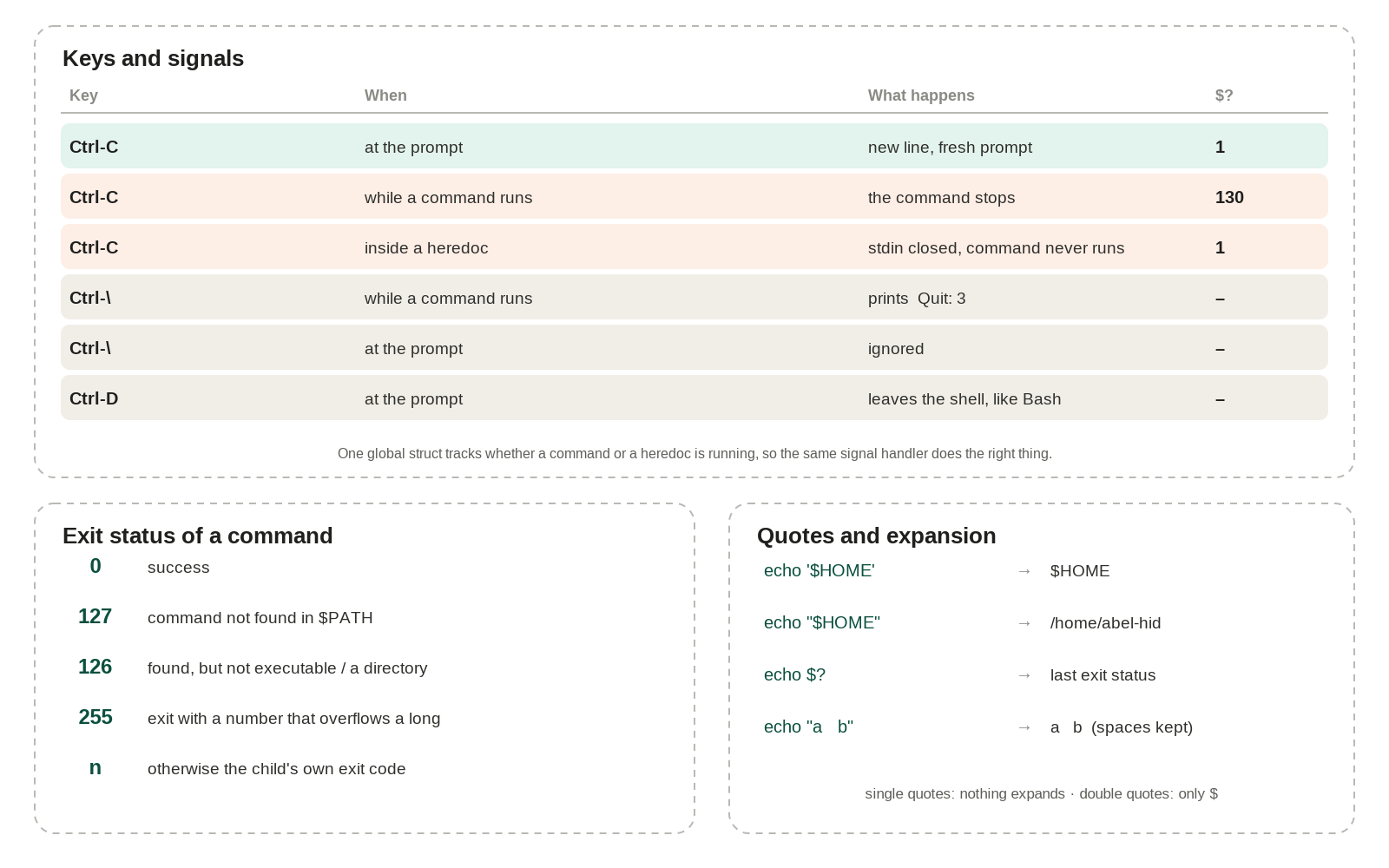
Keys like Ctrl-C have to do different things depending on what the shell is doing: show a fresh prompt when idle, interrupt a running command, or cancel a heredoc. The subject allows a single global variable, which the signal handler uses to know which case it is in:
void signal_handler(int signal)
{
if (g_exit_st.in_here_doc == 1 && signal == SIGINT)
{
close(0);
return ;
}
else if (signal == SIGINT)
{
ft_putstr_fd("\n", 1);
rl_on_new_line();
// rl_replace_line("", 0);
if (g_exit_st.in_cmd == 1)
{
g_exit_st.status = 130;
g_exit_st.in_cmd = 0;
}
else if (g_exit_st.in_cmd == 0)
{
g_exit_st.status = 1;
g_exit_st.in_cmd = 0;
rl_redisplay();
}
}
else if (signal == SIGQUIT && g_exit_st.in_cmd == 1)
ft_putstr_fd("Quit: 3\n", 1);
}
Cancelling a heredoc is done by closing stdin: readline() then returns, the heredoc loop stops, and the whole command is dropped. Exit codes follow Bash: 130 after Ctrl-C, 127 for an unknown command, 126 when a file can't be executed.
Lessons and improvements
- Quotes drive everything. Keeping them through the lexer and removing them only in the parser is what lets the expander respect single quotes, double quotes and word splitting.
- Every file descriptor needs an owner. Most pipeline bugs are a descriptor left open in the wrong process.
- Bash is the specification. For every edge case, the answer was to try it in Bash and match it, down to the error messages and exit codes.
- What I would improve. Every heredoc is written to the same
/tmp/heredocfile, so two heredocs in one pipeline share it; a unique file, or a pipe, per heredoc would fix that. And the bonus part,&&,||and parentheses, would need the flat command list to become a real syntax tree.
The full source, with a README describing every stage, builtin and exit code, is on GitHub.
About the project: minishell
A working shell modeled on Bash, written from scratch in C in a team of two. Each line goes through a lexer, a syntax check, heredocs, variable expansion and a parser before it runs, with pipes, redirections, builtins and Bash's own signals and exit codes.
- 7-stage pipeline
- Pipes + redirections
- Bash exit codes
Built with
- C
- fork / execve
- Pipes
- dup2
- Signals
- GNU Readline
- Make