On this page
Most people meet Docker through docker run nginx: somebody else's image, ready to go. Inception takes that away. Every service has to be built from a bare Debian image with my own Dockerfile, wired to the others by hand, and started by a script that knows whether this is its first boot or its hundredth.
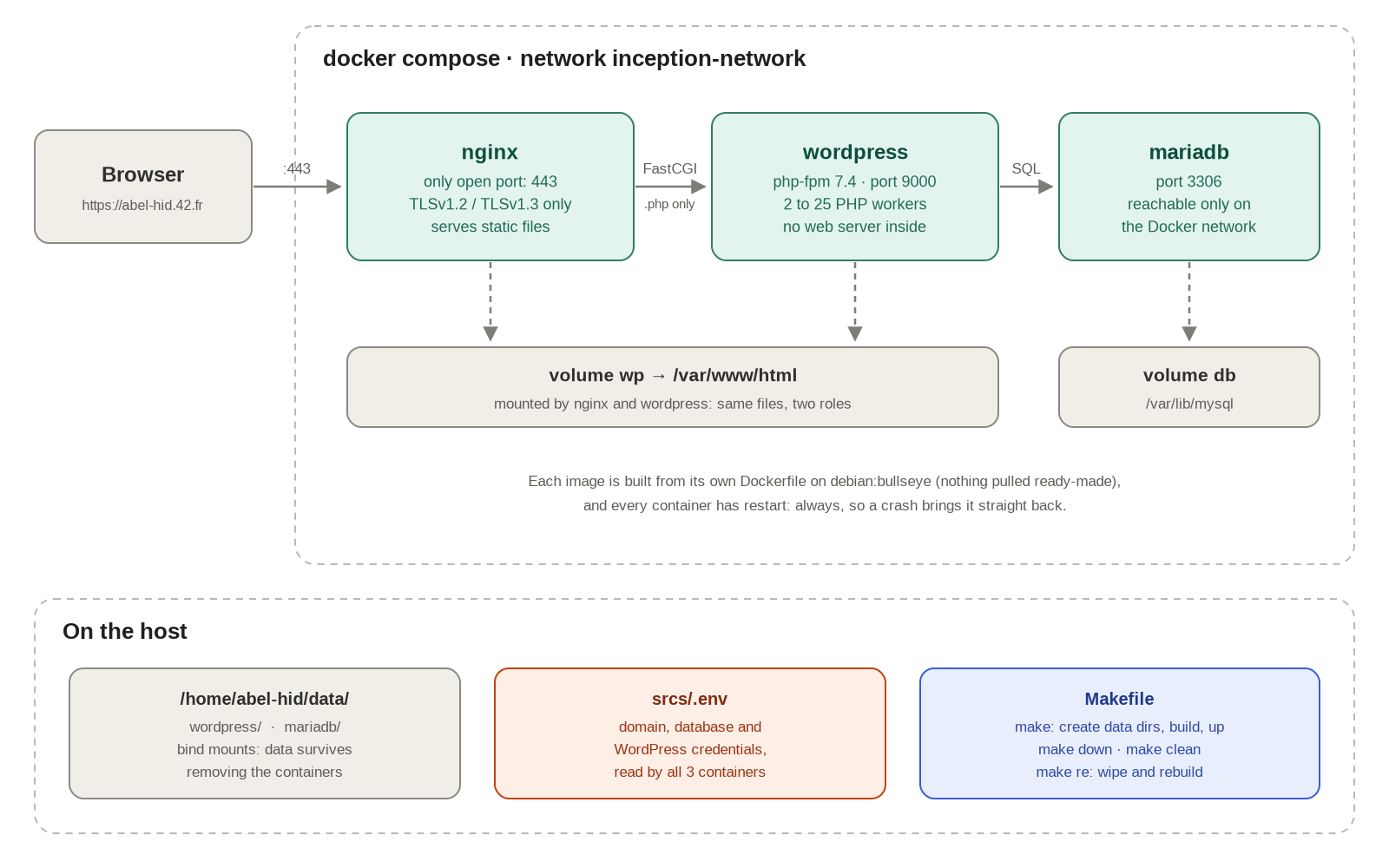
The result is a small production-style stack: NGINX with TLS in front, WordPress on PHP-FPM behind it, and MariaDB for the data, all started with one make. This article walks through it with the real files, and lets you boot the stack and knock on its door.
The goal
The 42 subject sets strict rules, and each one teaches something:
- One service per container, each built from its own Dockerfile. Pulling ready-made images is forbidden, apart from the base OS.
- NGINX is the only way in, on port 443, with TLS 1.2 or 1.3 only.
- WordPress runs with php-fpm and no web server; MariaDB runs alone.
- Two volumes, one for the database and one for the site files, stored on the host under
/home/login/data. - A dedicated Docker network, containers that restart after a crash, and no hacks such as
tail -forsleep infinityto keep them running.
- containers, each from its own Dockerfile
- 3
- open port: 443
- 1
- volumes on the host
- 2
- ready-made service images
- 0
Three containers, one file
Docker Compose describes the whole stack in one file: which images to build, how to configure them, which volumes and network they share, and what to do when one crashes. Each image is named after its service, and restart: always brings a crashed container back by itself.
services:
mariadb:
hostname: mariadb
image: mariadb
container_name: mariadb
env_file:
- .env
build: ./requirements/mariadb
volumes:
- db:/var/lib/mysql
networks:
- inception-network
restart: always
wordpress:
hostname: wordpress
image: wordpress
container_name: wordpress
build: ./requirements/wordpress/.
env_file:
- .env
volumes:
- wp:/var/www/html
networks:
- inception-network
restart: always
nginx:
hostname: nginx
container_name: nginx
image: nginx
build: ./requirements/nginx/.
env_file:
- .env
ports:
- "443:443"
volumes:
- wp:/var/www/html
restart: always
networks:
- inception-network
Only nginx has a ports section, and it publishes only 443. The other two containers are reachable only from inside inception-network, where Docker's DNS lets them find each other by name: NGINX talks to wordpress:9000, WordPress to mariadb.
Building every image
Every image starts from debian:bullseye and installs only what its service needs. Each Dockerfile is a handful of lines: install the package, copy a configuration file and a start script, and declare the command to run.
FROM debian:bullseye
RUN apt update && apt install -y mariadb-server
EXPOSE 3306
COPY ./conf/mysql.cnf /etc/mysql/mariadb.conf.d/
COPY ./tools/mysql.sh /etc/mysql/mysql.sh
RUN chmod +x /etc/mysql/mysql.sh
CMD ["/etc/mysql/mysql.sh"]
FROM debian:bullseye
RUN apt-get update && apt-get -y install php7.4 php-mysqli php-fpm wget
COPY ./conf/www.conf /etc/php/7.4/fpm/pool.d
COPY ./tools /var/www/
EXPOSE 9000
RUN chmod +x /var/www/wordpress.sh
CMD ["/var/www/wordpress.sh"]
FROM debian:bullseye
RUN apt update && apt install -y nginx openssl
RUN mkdir /etc/nginx/ssl
COPY ./conf/nginx.conf /etc/nginx/sites-enabled/default
COPY ./tools/nginx.sh /var/www/
RUN chmod +x /var/www/nginx.sh
EXPOSE 443
CMD ["/var/www/nginx.sh"]
WordPress's PHP-FPM is told to listen on the network instead of a local socket, so NGINX can reach it from another container:
[www]
user = www-data
group = www-data
listen = 9000
Keeping a container alive
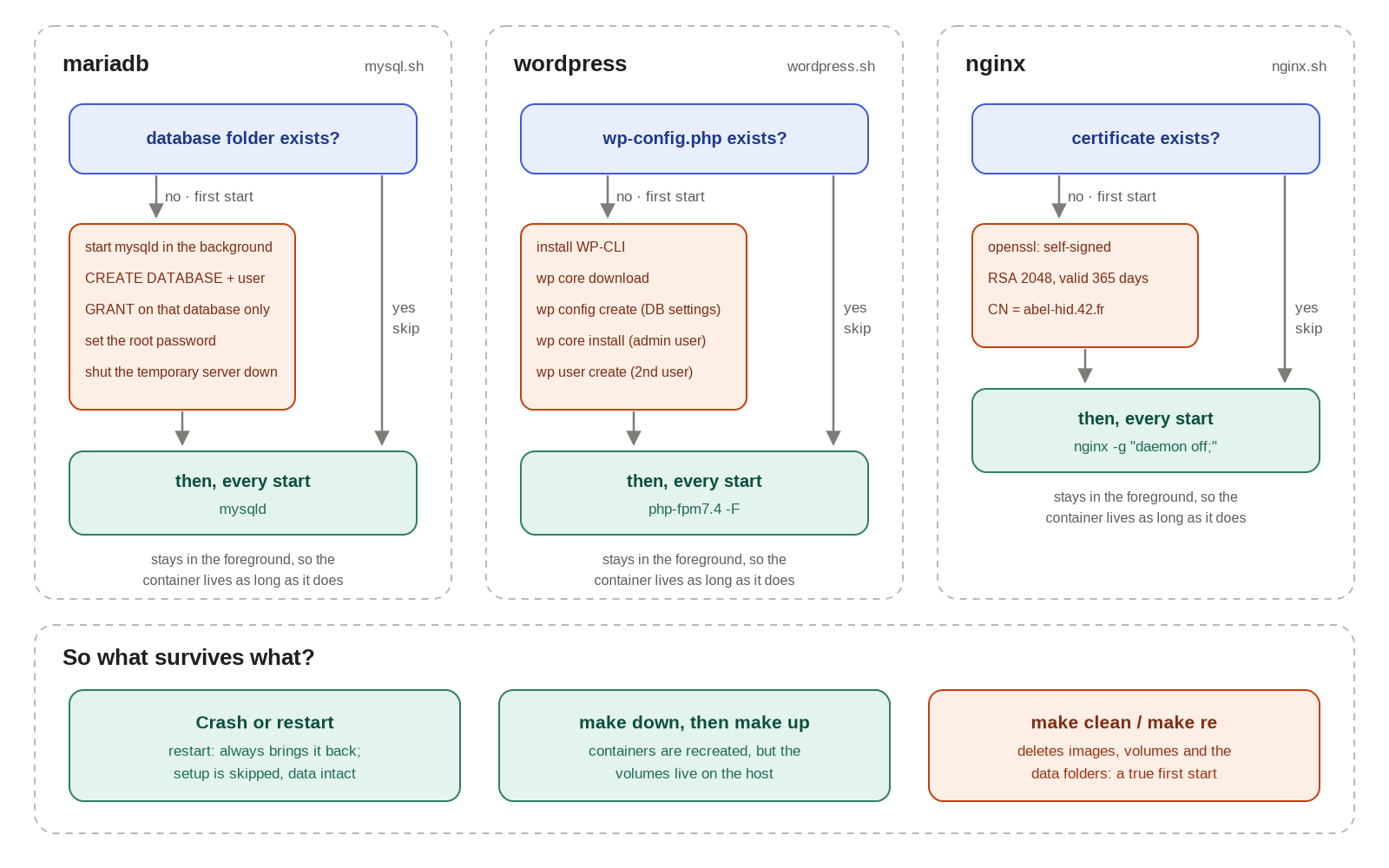
A container lives exactly as long as its main process, PID 1. If the command starts a daemon that goes into the background and returns, the container stops immediately. That's why the subject forbids keeping containers alive with tail -f or an infinite loop: the real server must be the process in the foreground.
So each start script ends by running its server in the foreground: mysqld, php-fpm7.4 -F, and for NGINX, daemon off:
if [ ! -f /etc/nginx/ssl/nginx.crt ]; then
openssl req -x509 -nodes -days 365 -newkey rsa:2048 -keyout /etc/nginx/ssl/nginx.key -out /etc/nginx/ssl/nginx.crt -subj "/C=MA/ST=Casablanca/L=Casablanca/O=1337/OU=1337/CN=abel-hid.42.fr";
fi
nginx -g "daemon off;"
First start vs restart
A container can start many times, but the database should only be created once and WordPress installed once. Each start script therefore checks before it acts. MariaDB looks for the database folder:
if [ ! -d "/var/lib/mysql/$DB_NAME" ]; then
echo "Database $DB_NAME does not exist. Initializing..."
mysqld &
sleep 5
OUTPUT_FILE="/etc/mysql/init.sql"
touch $OUTPUT_FILE
echo "CREATE DATABASE IF NOT EXISTS $DB_NAME;" > $OUTPUT_FILE
echo "CREATE USER IF NOT EXISTS '$DB_USER'@'%' IDENTIFIED BY '$DB_PASSWORD';" >> $OUTPUT_FILE
echo "GRANT ALL PRIVILEGES ON $DB_NAME.* TO '$DB_USER'@'%';" >> $OUTPUT_FILE
echo "FLUSH PRIVILEGES;" >> $OUTPUT_FILE
echo "ALTER USER 'root'@'localhost' IDENTIFIED BY '$MYSQL_ROOT_PASSWORD';" >> $OUTPUT_FILE
mysql -u root < $OUTPUT_FILE
mysqladmin -u root -p"$MYSQL_ROOT_PASSWORD" shutdown
rm -f $OUTPUT_FILE
else
echo "Database $DB_NAME already exists. Skipping setup."
fi
mysqld
Only on the first start does it create the database, a user allowed to touch only that database, and the root password; then it restarts mysqld properly. WordPress does the same with wp-config.php, using WP-CLI to download, configure and install WordPress with no setup wizard:
if [ ! -f /var/www/html/wp-config.php ]; then
wget https://raw.githubusercontent.com/wp-cli/builds/gh-pages/phar/wp-cli.phar
chmod +x wp-cli.phar
mv wp-cli.phar /usr/local/bin/wp
cd /var/www/html
if [ ! -d /var/www/html/wp-admin ]; then
wp core download --allow-root
wp config create --dbname="$DB_NAME" --dbuser="$DB_USER" --dbpass="$DB_PASSWORD" --dbhost="$MYSQL_HOSTNAME" --dbprefix=wp_ --allow-root --force
wp core install --allow-root --url="$WP_URL" --title="$WP_TITLE" --admin_user="$WP_ADMIN_LOGIN" --admin_password="$WP_ADMIN_PASSWORD" --admin_email="$WP_ADMIN_EMAIL"
wp user create --allow-root "$WP_USER_LOGIN" "$WP_USER_EMAIL" --user_pass="$WP_USER_PASSWORD"
else
echo "WordPress: Files already present. Skipping setup."
fi
chown -R www-data:www-data /var/www/html
find /var/www/html -type d -exec chmod 755 {} \;
find /var/www/html -type f -exec chmod 644 {} \;
fi
/usr/sbin/php-fpm7.4 -F
Try it. Run make, then stop the stack and start it again, and watch which steps run:
make builds everything from scratch. make down removes the containers; make up starts new ones on the same data.
nginxstopped
:443 → host 443
wordpressstopped
:9000 (php-fpm)
mariadbstopped
:3306 (not published)
host /home/abel-hid/data/mariadb
folder doesn't exist yet
host /home/abel-hid/data/wordpress
folder doesn't exist yet
$ press make to build and start the stackSimulated from the Makefile, docker-compose.yml and the three start scripts. Variable values come from a .env file and are not shown.
Data that outlives containers
Containers are disposable: make down deletes them. The data must not be. Both volumes are bound to folders on the host, as the subject requires, so the database and the site survive any number of container rebuilds:
volumes:
wp:
driver: local
name: wp
driver_opts:
type: none
o: bind
device: /home/abel-hid/data/wordpress
db:
driver: local
name: db
driver_opts:
type: none
o: bind
device: /home/abel-hid/data/mariadb
The Makefile ties it together. Note that make starts with make clean, which deletes the images, the volumes and the data folders, so make always gives a true first start, while make up reuses what is there:
all: build
init:
mkdir -p /home/abel-hid/data/wordpress
mkdir -p /home/abel-hid/data/mariadb
build: clean init
cd srcs && docker compose up --build
up:
cd srcs && docker compose up
down:
cd srcs && docker compose down
clean:
cd srcs && docker compose down --rmi all --volumes
docker system prune -af
rm -rf /home/abel-hid/data
re: clean all
One door: NGINX and TLS
NGINX is the single entry point. It listens on 443 only, accepts TLS 1.2 and 1.3 only, serves the files itself and hands anything ending in .php to WordPress over FastCGI:
server {
listen 443 ssl;
server_name abel-hid.42.fr;
ssl_certificate /etc/nginx/ssl/nginx.crt;
ssl_certificate_key /etc/nginx/ssl/nginx.key;
ssl_protocols TLSv1.3 TLSv1.2;
index index.php;
root /var/www/html;
location ~ \.php$
{
try_files $uri =404;
fastcgi_pass wordpress:9000;
include fastcgi_params;
fastcgi_param SCRIPT_FILENAME $document_root$fastcgi_script_name;
}
}
The certificate is self-signed, generated with OpenSSL when the NGINX container starts, which is fine for a local project: browsers warn about it, and curl needs -k to accept it. Here is what happens to a few requests made from the host:
abel-hid.42.fr points to the local machine. Pick a request and see how far it gets.
How far it gets
- host :443
- →nginx (TLS 1.3)
- →index.php → FastCGI
- →wordpress :9000
- →mariadb :3306
$ curl -k https://abel-hid.42.fr/HTTP/1.1 200 OKContent-Type: text/html; charset=UTF-8 <!DOCTYPE html> … the WordPress home page
The normal path: TLS at NGINX, then PHP in the WordPress container, which reads the posts from MariaDB.
Outputs reproduced from the configuration: only port 443 is published, and nginx accepts TLSv1.2 and TLSv1.3 only.
What I would do differently
- Keep secrets out of Git. Every password reaches the containers through a
.envfile. Today I would keep that file out of the repository entirely and use Docker secrets, which Compose mounts as files instead of environment variables. - Wait for readiness, not for time. The MariaDB script sleeps 5 seconds before running its SQL, and nothing makes WordPress wait for MariaDB. A health check, with
depends_onon it, would make the first start reliable on any machine. - Put the certificate where it lasts. It is generated inside the NGINX container, so every new container makes a new one. Creating it at build time, or storing it in a volume, would keep it stable.
- Pin the base image.
debian:bullseyewas the right choice for the subject, but pinning a digest would make every rebuild identical.
The Dockerfiles, scripts and Compose file are all on GitHub.
About the project: Inception
A small production-style web stack with Docker Compose: NGINX with TLS in front, WordPress on PHP-FPM, and MariaDB, each built from its own Dockerfile on Debian with no ready-made images.
- Docker Compose
- TLS 1.2 / 1.3
- 3 services
Built with
- Docker
- Docker Compose
- Nginx
- TLS
- MariaDB